Current
WI-PKG-014 • Rev D
Controlled work instructions
Stop building from outdated work instructions.
One QR per workstation. Always the latest approved revision.
No credit card required. 14-day trial included.
QR-first
Always current revision
No app install
Works on any phone
Audit-ready
Publish history + rollback
Latest QR
Mutable link used on workstation posters.
Pinned QR
Immutable link for lot labels and traceability.
- Upload new revisions as Draft.
- Publish to set one revision as Current.
- Latest QR always opens the Current revision.
Operators scan Latest, while QA keeps full access to superseded revisions in history. Audit mode ties acknowledgements to named operators.
The pain
Outdated instructions create expensive mistakes.
When updates don't reach the shop floor, scrap and rework follow. Without document control, audits become a scramble.
Wrong revision used
Operators can't tell which PDF is current.
Changes don't stick
Updates are announced, but the floor keeps using the last file they saved.
Audit gaps
Proving which revision was current (and who acknowledged it) takes hours.
Why RevQR
Built for real shop floors.
Concrete capabilities that give manufacturing teams confidence from day one.
Built for manufacturers
Designed for shops with 10–200 operators, recurring work instructions, and engineering changes.
No vendor lock-in
PDF and image files stay yours. Export everything at any time.
Runs on any device
No app to install. Works on any phone, tablet, or workstation browser.
EU-hosted, GDPR-ready
Data stored in the EU. DPA and subprocessor list published.
How it works
A vault built for the shop floor.
Work instruction version control that keeps editors in control and operators in motion with QR-first access.
01
Upload a revision
Create the document and upload a Draft revision.
02
Publish it
One revision becomes Current; the previous one is Superseded.
03
Scan the QR
Scan the QR or open the link you share in chat. Operators land on the latest approved revision — no login.
Operator access
Two access modes for the shop floor.
Default is no-login QR. Enable audit mode only when you need named sign-off.
No-login QR access
Operators scan and open the latest approved revision instantly.
Best for
- Shared workstations and high scan volume
- Fast pilots with minimal change management
- Teams that don't need named sign-off
You get
- One QR per workstation that always opens the Current revision
- Fast mobile preview for PDFs and images
- Optional acknowledgements without operator identity
Work instruction sign-off (Operator ID + PIN)
Optional: require Operator ID + PIN on selected links to tie acknowledgements to named operators.
Best for
- ISO-style audits and compliance ("read and understood")
- Change control where you must prove who acknowledged which revision
- High-risk instructions (safety, quality, critical processes)
You get
- Per-operator acknowledgements by revision
- No operator user accounts (just Operator IDs + PINs)
- Sign-in stays tied to the current revision (keeps sign-offs accurate)
Operators never need user accounts in either mode: just QR links, and optionally Operator IDs + PINs.
Link types
Latest and pinned QR links.
Posters should update automatically; traceability labels must not.
Latest (mutable) QR updates when you publish.
Pinned (immutable) QR locks to a specific revision.
Fast mobile preview for PDF and images.
Audit-ready history with one-click rollback and acknowledgements.
Screenshots
Screens the floor recognizes.
Current vs Superseded, revision history, and the QR mobile view.

Document list
See Current and Superseded status at a glance.

Revision history
Publish dates, revision history, and one-click rollback.
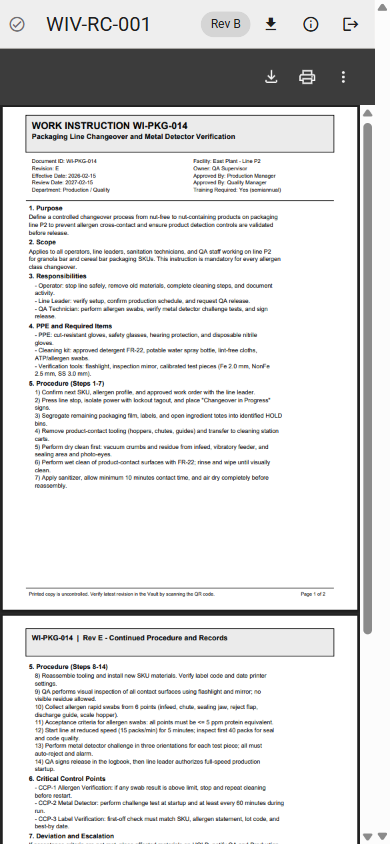
QR mobile view
PDF and images open instantly on any phone.
2-minute demo
See RevQR in action.
A short walkthrough you can share internally. Live demo only on request.
Deployment
Hosted or in your cloud.
Start on managed cloud. Move to managed self-host if IT requires.
Managed cloud
We host, monitor, and upgrade. Fast onboarding.
Managed in your cloud
We deploy into your cloud account and handle upgrades, backups, and monitoring.
Need help rolling out QR on the floor?
We can import documents, generate labels, and train editors in days.
Pricing
Simple pricing that doesn't punish operators.
One flat monthly price. Unlimited users, with 50 GB storage included.
Starter
Vault Starter
100 EUR / month
Includes core document control.
Unlimited users
50 GB storage included
Operators scan free
Managed self-host
Customer cloud
By quote
We deploy and operate in your account.
Data residency control
Upgrades and monitoring by us
SSO and security reviews
Pilot onboarding included
Free trial
Start with a free trial
Create your vault, publish a revision, and share QR links before committing.
No card upfront
Operators scan without accounts
Need a done-with-you pilot?
Two weeks, 10-30 documents, 1-3 workstations. We handle imports, QR posters, and editor training.
FAQ
Common questions about QR code work instructions.
Answers to what we hear most from quality and engineering teams.
How is RevQR different from Google Drive or SharePoint?
Generic file storage has no revision lifecycle, no QR-first access, and no operator acknowledgements. RevQR is purpose-built for controlled work instructions with publish, supersede, and rollback.
Do operators need accounts to view instructions?
No. The default mode is anonymous QR scan. Optional audit mode uses Operator ID + PIN for named sign-off — still no user account required.
Can we self-host RevQR?
Yes. Start on managed cloud, then move to managed self-host (your cloud account, we operate) if your IT policy requires it.
What file types are supported?
PDF, PNG, and JPEG. Max 50 MB per file. Documents open instantly on any phone browser.
Can RevQR help with ISO 9001 audits?
RevQR supports ISO 9001-style control of work instructions: one current revision at point of use (QR), revision history (publish/supersede + rollback), and optional per-operator acknowledgements. ISO certification depends on your QMS and procedures; RevQR provides the evidence trail.
Can operators edit documents?
No. Editors create and publish revisions. Operators only view the current approved revision via QR — no changes, no confusion.
Contact us
Talk to us about your instructions.
Tell us about your documents, revision churn, or audit requirements.